The Best 75% Keyboard for Programming
 Researched by Johnny Alto · Published July 29, 2026
Short answer: The best 75% keyboard for programming is the Keychron V1. The Keychron V1 is the standout value 75% for programming because it comes hot-swap, gasket-mounted, and with QMK and VIA support, which means you can remap any key including all the function keys to whatever your editor and shortcuts need, right down to the keymap saved on the board. The main things to weigh are the function row is the point, qmk/via remapping, hot-swap, and layout quirk.
Top pickKeychron V1View offer →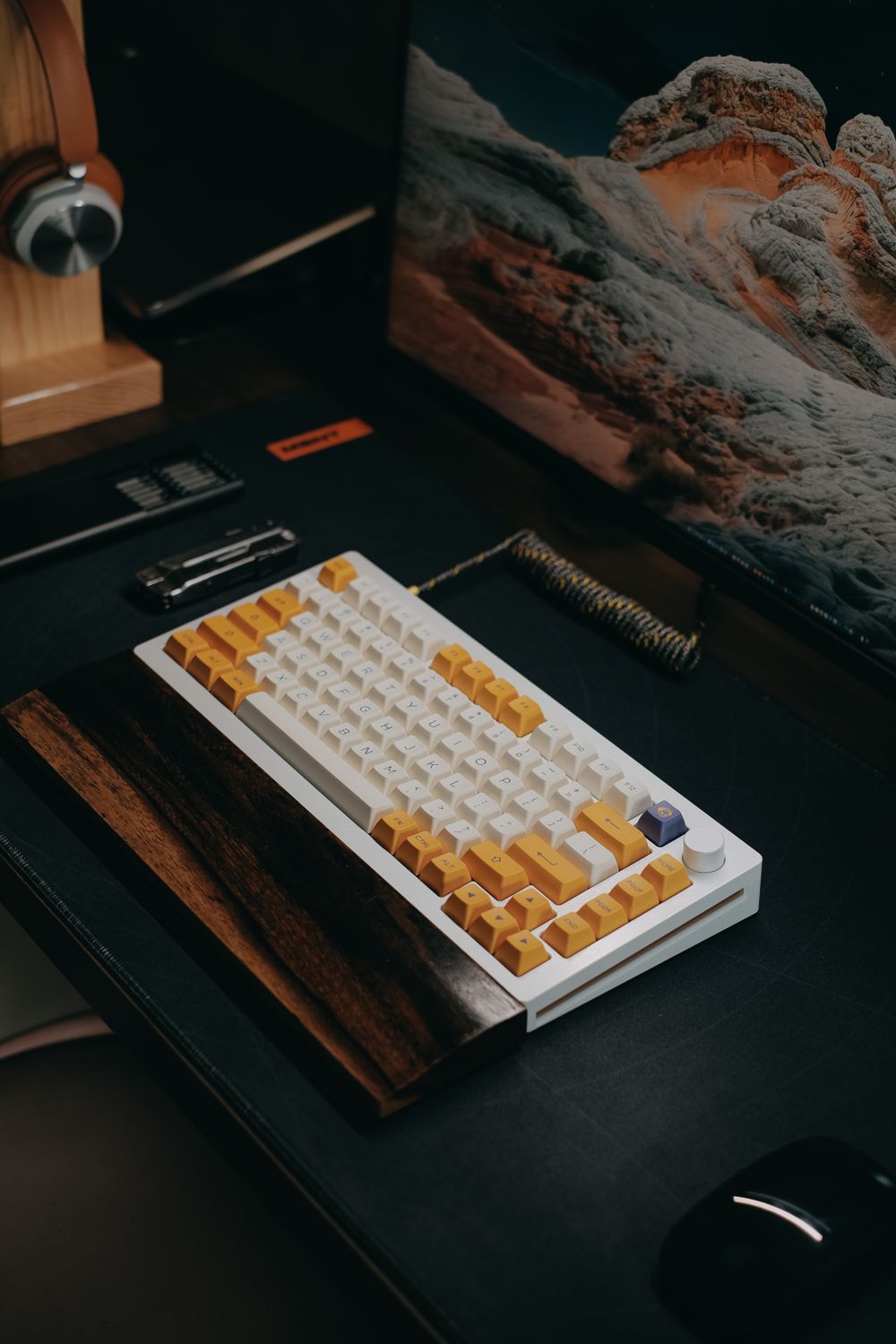
Keychron V1
The Keychron V1 is the standout value 75% for programming because it comes hot-swap, gasket-mounted, and with QMK and VIA support, which means you can remap any key including all the function keys to whatever your editor and shortcuts need, right down to the keymap saved on the board. Stock sound and feel are surprisingly good for the price thanks to factory foam and decent stabilizers. The honest limits: the base model is wired only (the wireless variant costs more and is a different SKU), and the doubleshot ABS keycaps on some colorways are a slight downgrade from PBT. For a remappable, well-built coding board that you can tune endlessly, it is the easy pick.
View on Amazon Editorial illustration.A 75% keeps the function row and arrows that a 65% either drops or hides, packed into a footprint only slightly larger, which makes it the layout most programmers land on. You keep F5 to refresh, F2 to rename, and the debug keys as real physical keys. This is for coders who want compact without giving up the function row. Here is the value hot-swap favorite, a low-profile option, and a wireless pick.
How do the best options for 75% keyboard for programming compare?
| Pick | Product | Why it makes the list |
|---|---|---|
| Top pick | Keychron V1 | The Keychron V1 is the standout value 75% for programming because it comes hot-swap, gasket-mounted, and with QMK and VIA support, which means you can remap any key including all the function keys to whatever your editor and shortcuts need, right down to the keymap saved on the board. |
| Best low-profile | NuPhy Air75 V2 | A slim, wireless, hot-swap 75% that is excellent if a normal mechanical board feels too tall for all-day coding. Low-profile switch selection is smaller and the flat typing angle is not for everyone. |
| Best wireless upgrade | Keychron V1 Max | The wireless 2.4GHz and Bluetooth version of the V1 with the same great layout and QMK/VIA. It costs more and the exact Amazon SKU and switch options rotate, so confirm the listing before buying. |
| Best all-in-one budget | Epomaker TH80 Pro | A feature-loaded budget 75% with triple-mode wireless, hot-swap, and a knob. Build quality and QC are less consistent than Keychron and the specific listing revision changes often on Amazon. |
What should you look for in 75% keyboard for programming?
A few things separate a good 75% keyboard for programming from a frustrating one: the function row is the point, qmk/via remapping, hot-swap, and layout quirk. Weigh these before you buy.
- The function row is the point: a 75% keeps F1 to F12 as real keys, which coders lean on for refresh, rename, and debug; a 65% hides them on a layer.
- QMK/VIA remapping lets you put any shortcut on any key and save it to the board, which the Keychron V1 supports; this is the single most useful feature for programming.
- Hot-swap lets you tune switch feel later without soldering.
- Layout quirk: 75% boards pack keys tight with no gaps, so the right-hand keys sit closer together than you may be used to.
Why coders keep the function row
Programming leans on the function row far more than casual typing does. F2 renames a symbol, F5 runs or refreshes, F9 toggles a breakpoint, F12 jumps to a definition, and stepping through a debugger is F-keys the whole way. On a 65% those all move onto a hidden layer, which turns a single reflexive tap into a two-key hold every time you debug, and that friction adds up fast across a workday. A 75% solves it by keeping the full function row as real keys while still trimming the numpad and tightening the spacing, so you land on a board only a little wider than a 65% but with nothing you actually use buried on a layer. Pair that with QMK or VIA remapping and the board becomes a real tool: you can move Escape, remap Caps Lock to Control or a layer key, and bind editor shortcuts to exactly where your fingers want them, saved on the keyboard itself so it works on any machine you plug into.
What are the best alternatives?
NuPhy Air75 V2
A slim, wireless, hot-swap 75% that is excellent if a normal mechanical board feels too tall for all-day coding. Low-profile switch selection is smaller and the flat typing angle is not for everyone.
View on AmazonKeychron V1 Max
The wireless 2.4GHz and Bluetooth version of the V1 with the same great layout and QMK/VIA. It costs more and the exact Amazon SKU and switch options rotate, so confirm the listing before buying.
Epomaker TH80 Pro
A feature-loaded budget 75% with triple-mode wireless, hot-swap, and a knob. Build quality and QC are less consistent than Keychron and the specific listing revision changes often on Amazon.
Bottom line: the Keychron V1 is the remappable, well-built, great-value 75% that most programmers should buy, the NuPhy Air75 V2 is the low-profile pick, and the V1 Max adds wireless. The function row plus QMK remapping is what makes this layout ideal for code. Compare it with our 65% guide and our Mac wireless guide.
Frequently asked questions
What is the best 75% keyboard for programming?
Keychron V1. The Keychron V1 is the standout value 75% for programming because it comes hot-swap, gasket-mounted, and with QMK and VIA support, which means you can remap any key including all the function keys to whatever your editor and shortcuts need, right down to the keymap saved on the board.
What should you look for in 75% keyboard for programming?
Focus on the function row is the point, qmk/via remapping, hot-swap, and layout quirk.
What is a good alternative to the Keychron V1?
The NuPhy Air75 V2. A slim, wireless, hot-swap 75% that is excellent if a normal mechanical board feels too tall for all-day coding. Low-profile switch selection is smaller and the flat typing angle is not for everyone.
Related buying guides
- Airbrush for Miniature Painting
- SD Card for the Anbernic RG35XX
- Foam Inserts for Wingspan
- Wet Palette for Miniature Painting
- Lube for Linear Switches
This is a research-based buying guide, not a personal hands-on review. Product details, prices, and availability can change; confirm the current listing on Amazon. As an Amazon Associate I earn from qualifying purchases. Amazon and the Amazon logo are trademarks of Amazon.com, Inc. or its affiliates.
← More Tech & Creator Gear · All guides · How we research · About · Affiliate Disclosure · Privacy Policy · Contact