Keychron Q11
The Q11 is the best-built split most people can actually buy on Amazon: a full CNC aluminum body, gasket mount.
View on Amazon → Researched by Johnny Alto · Updated October 12, 2026
Short answer: Our top pick is the Keychron Q11. The Q11 is the best-built split most people can actually buy on Amazon: a full CNC aluminum body, gasket mount, hot-swappable switches, PBT keycaps.
Top pickKeychron Q11View offer →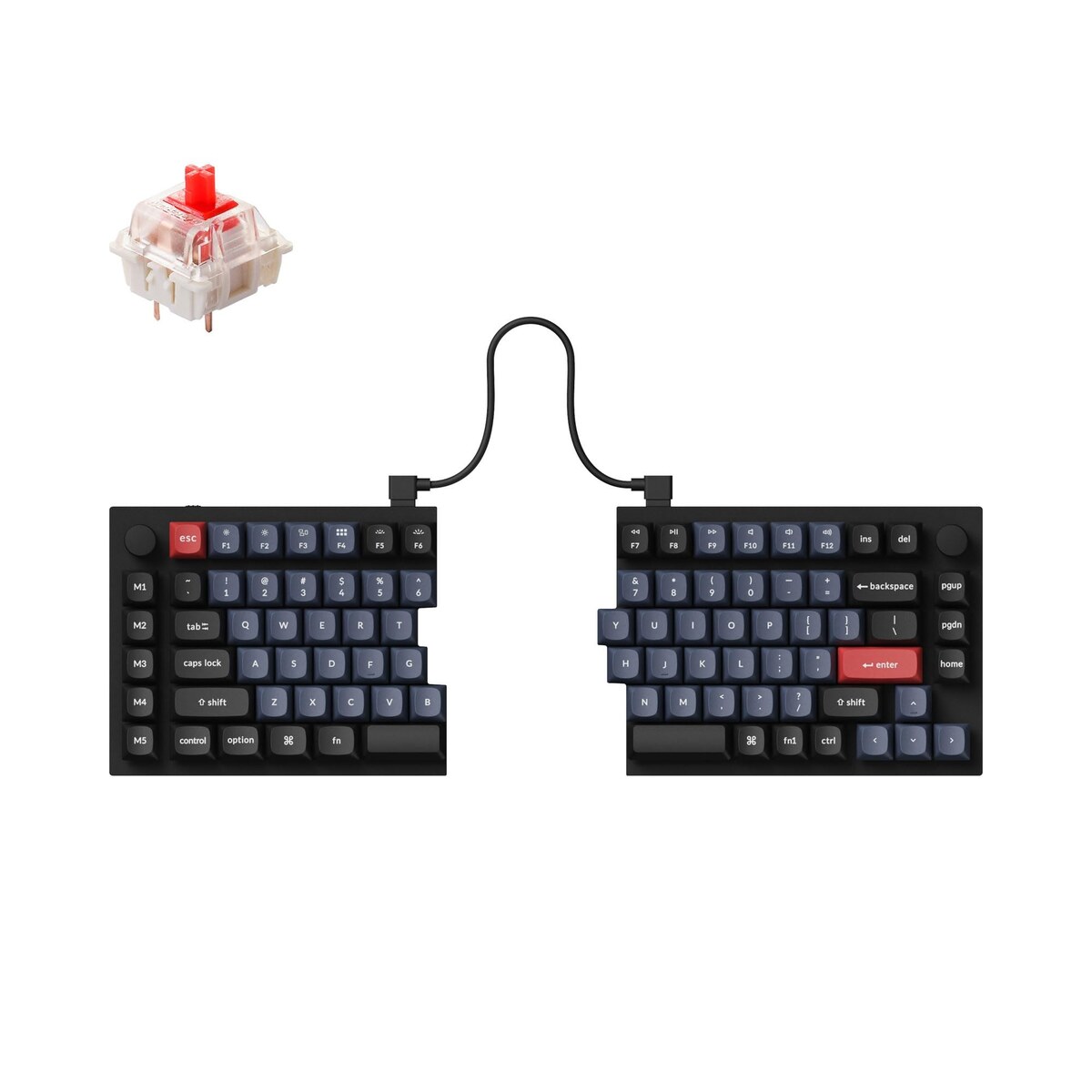
The Q11 is the best-built split most people can actually buy on Amazon: a full CNC aluminum body, gasket mount, hot-swappable switches, PBT keycaps, and open-source QMK and VIA so you can.
People who type all day and feel shoulder rounding, wrists bending outward, or a pinched-in chest are the real buyers here. A true split lets each half sit shoulder-width apart so your forearms run straight instead of angling inward, which is the single biggest posture win. This guide is for someone ready to trade a week or two of slower typing for long-term comfort. Here is the best-built pick, a gaming option, a budget one, and the tenting detail most people miss.
The Q11 is the best-built split most people can actually buy on Amazon: a full CNC aluminum body, gasket mount.
View on Amazon →The split halves separate up to about 9 inches and it has real onboard macros and profiles plus an optional Lift Kit for 5.
View on Amazon →A one-piece split at a much lower price with low-profile switches and a built-in wrist rest, so the relearning curve is.
View on Amazon →Keeps a full number pad most splits sacrifice and the halves separate up to about 8 inches.
View on Amazon →A few things separate a good split ergonomic mechanical keyboard from a frustrating one: two separate halves matter most, look for tenting and negative tilt, prioritize programmability, and honest caveat. Weigh these before you buy.
A split keyboard looks dramatic, but it is solving a very specific and very common posture problem, and understanding that problem tells you what to look for. On a normal one-piece keyboard your two hands are forced close together in the middle of the board, which means your forearms angle inward toward each other and your wrists bend outward toward the pinky side, a position called ulnar deviation, while your shoulders round forward to bring your hands together. Held for hours a day, that inward, hunched posture is a real source of wrist, forearm, and shoulder strain. A true split fixes it by breaking the keyboard into two independent halves that you can slide apart to shoulder width, so each hand sits directly under its own shoulder, your forearms run straight forward instead of converging, and your chest opens up instead of collapsing inward. That separation is the core benefit, which is why the amount a board splits, ideally six to nine inches or more, matters more than almost any other feature. The second lever is tenting, which is raising the inner edges of each half so your palms tilt toward each other like a gentle handshake rather than lying flat, relieving the palms-down pronation that also strains the wrists, and it is worth knowing that many splits, including some excellent ones, do not tent out of the box and require add-on riser feet or a lift kit you buy separately. The honest cost of all this is a real adjustment period: because a split moves keys, especially the center columns, your typing speed will drop noticeably for one to two weeks while your hands relearn the layout, and choosing a programmable, hot-swappable board makes that period easier because you can remap awkward keys and tune the switch weight to your hands.
The split halves separate up to about 9 inches and it has real onboard macros and profiles plus an optional Lift Kit for 5, 10, or 15-degree tenting. The plastic body feels less premium than the Keychron, and proper tenting is a separate purchase.
View on AmazonA one-piece split at a much lower price with low-profile switches and a built-in wrist rest, so the relearning curve is gentler. The halves are fixed, so you cannot spread them apart, and there is no tenting.
View on AmazonKeeps a full number pad most splits sacrifice and the halves separate up to about 8 inches. The footprint is bulky and the companion software is dated compared to VIA.
View on AmazonBottom line: the Keychron Q11 is the premium remappable split, the Kinesis Freestyle Edge is the gaming pick with real tenting, and the Perixx is the gentle budget entry. Plan for the relearning curve and for tenting risers. Compare it with our wrist-pain ergo guide and our carrying case guide.
Keychron Q11. The Q11 is the best-built split most people can actually buy on Amazon: a full CNC aluminum body, gasket mount, hot-swappable switches, PBT keycaps, and open-source QMK and VIA so you can remap every key and build layers without vendor software.
Focus on two separate halves matter most, look for tenting and negative tilt, prioritize programmability, and honest caveat.
The Kinesis Freestyle Edge RGB (Cherry MX Red). The split halves separate up to about 9 inches and it has real onboard macros and profiles plus an optional Lift Kit for 5, 10, or 15-degree tenting. The plastic body feels less premium than the Keychron, and proper tenting is a separate purchase.
This is a research-based buying guide, not a personal hands-on review. Product details, prices, and availability can change; confirm the current listing on Amazon. As an Amazon Associate I earn from qualifying purchases. Amazon and the Amazon logo are trademarks of Amazon.com, Inc. or its affiliates.
← More Tech & Creator Gear · All guides · How we research · About · Affiliate Disclosure · Privacy Policy · Contact